
How to Create a Shared Album on WhatsApp vs. Eventocam: Guide and Comparison
INSTANT DISCOUNT 15% - COUPON: NEW15
Are you getting married soon? You’ve probably already imagined the scene: hundreds of guests with their phones held high, capturing every kiss, every dance, and every spontaneous moment. You have dozens of “unofficial” photographers out there creating unique memories. But how are you going to get all those photos afterward?
The first idea that crosses the mind of almost every couple is: “Let’s make a WhatsApp group.” It’s free, it’s fast, and everyone has it. But is it really the best option for the most important day of your life?
In this article, we will analyze how to create a shared album on WhatsApp, its hidden limitations (that no one tells you until it’s too late), and why a specialized platform like Eventocam is the alternative that guarantees you won’t lose a single memory (or its quality).
The “Easy” Option: How to Use WhatsApp to Collect Wedding Photos
If you decide to go the traditional route, it is important to know how to optimize it as much as possible. Searching for “how to create a shared album on WhatsApp” is very common, although the reality is that WhatsApp doesn’t have “shared albums” as such, but rather groups or broadcast lists.
Step-by-Step to Create a Repository on WhatsApp:
Create the Group: Open the app, select “New Group,” and add your contacts.
Configure Permissions: Go to group settings. If you don’t want it to fill up with memes and “Cheers to the happy couple!” texts, you should restrict message sending, although this makes interaction difficult.
Share the Link: Generate an invitation link or a QR code from the group settings and print it on the table cards.
Does it work? Yes, the photos arrive.
Is it efficient? No.
The 4 Capital Sins of Using WhatsApp at Your Wedding
Before you print that WhatsApp QR code, consider these four factors that usually ruin the post-wedding experience.
1. Aggressive Compression: The Enemy of Your Memories
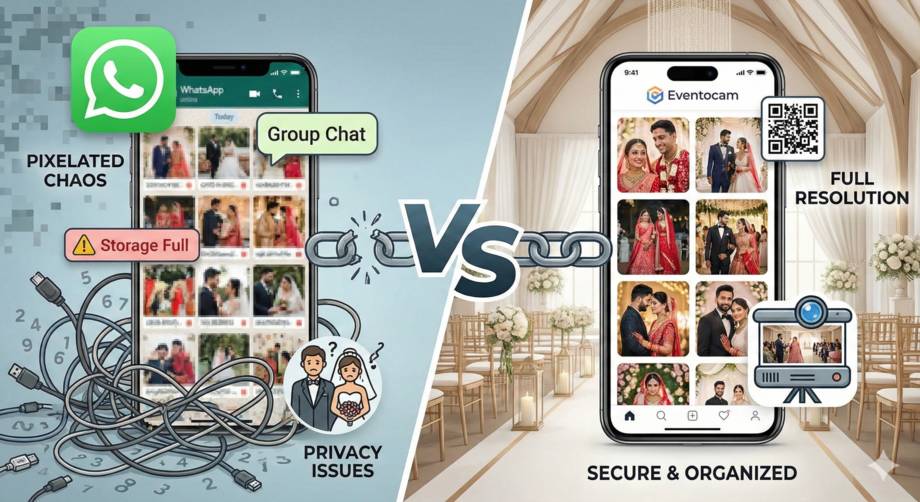
This is the most critical point. When a guest sends a photo via WhatsApp, the application applies a brutal compression algorithm to save data.
An original 12-Megapixel photo (suitable for printing) is reduced to just a few Kilobytes.
Result: If you try to print that photo for your physical album or enlarge it on a canvas, it will look pixelated and blurry.
2. Gallery Chaos (Infinite Scroll)
WhatsApp is a messaging app, not a gallery. Photos get mixed with comments, emojis, voice notes from great-aunts, and stickers.
To find the photo of the cake cutting, you’ll have to scroll for minutes through hundreds of text messages. There is no organization by moments, no albums, and no filters.
3. The Privacy Nightmare (GDPR)
By putting all your guests into the same WhatsApp group, you are making their phone numbers visible to everyone else.
Do you want your partner’s coworker to have your teenage cousin’s phone number?
Or your boss to have access to the numbers of your college friends?
This violates basic privacy norms and often annoys many guests, who will end up muting or leaving the group.
4. File Expiration
If you change phones or don’t make a backup, those photos disappear. WhatsApp is not a permanent cloud storage service.
INSTANT DISCOUNT 15% - COUPON: NEW15
Eventocam: The Professional Alternative for Modern Weddings
This is where Eventocam comes in. We have designed our platform specifically to solve the problems that general messaging apps cannot.
If your goal is to “collect wedding guest photos in high quality,” Eventocam is not just an alternative; it is the evolution.
What Makes Eventocam Different?
1. Guaranteed Original Quality (No Compression)
Unlike WhatsApp, Eventocam uploads photos exactly as they were taken.
If your friend’s iPhone 15 takes a 24MP photo, you receive a 24MP photo.
You can print your wedding album with guest photos without fear of seeing blurry pixels.
2. Privacy and Security (No Shared Phone Numbers)
With Eventocam, guests do not need to exchange phone numbers or join social groups.
They scan a QR code.
They upload the photo.
Done.
No one sees anyone else’s personal data. It is secure, discreet, and complies with privacy regulations.
3. The “WOW” Factor: Live Slideshow (Live Show)
This is a feature WhatsApp simply cannot offer. With Eventocam, you can connect a projector or screen in the wedding hall.
As guests upload photos, they appear in real-time on the big screen.
This encourages people to take more photos (gamification) and creates a fun, connected experience during the banquet.
4. Automatic Organization and Simple Download
The next day, you won’t have to search through thousands of chats. You will have a clean, organized web gallery that is easy to download with a single click (“Download All”).
Comparison: WhatsApp vs. Eventocam
Here is the real difference:
| Feature | WhatsApp (Group) | Eventocam |
| Image Quality | Compressed (Low quality) | Original (High Resolution) |
| Privacy | Phone numbers visible | 100% Private (Anonymous) |
| Ease for Guests | Requires app & sharing number | QR Scan & Done (Web app) |
| Organization | Linear chat (mixed with text) | Organized visual gallery |
| Wedding Experience | None (everyone stares at their phone) | Live Projection (Live Slideshow) |
| Download for Couple | Save one by one | “Download All” button |
Step-by-Step Guide: How to Use Eventocam at Your Wedding
Setting up a professional shared album is easier than creating a WhatsApp group. Follow these steps:
Step 1: Create Your Event in Seconds
Go to Eventocam registration page, sign up, and name your wedding (e.g., “Maria & John’s Wedding”). Personalize the cover with a photo of the two of you.
Step 2: Print the QR Codes
The platform will automatically generate a unique QR code for your event.
Tip: Print this QR on small cards to place on the tables, on the menu, or on a large sign at the entrance of the hall with the phrase: “Help us capture every moment.”
Step 3: Enjoy! (Live Mode)
During the wedding, activate “Presentation Mode” on the DJ’s screen or the venue’s display. You’ll see how excited people get when they see their photos projected instantly.
Step 4: The Emotional Afterglow
The next day, you can view all the photos, delete the ones you don’t like (there’s always a blurry or inappropriate one), and share the link to the full gallery with all the guests so they can relive the day too.
Conclusion: Don’t Let Your Memories Pixelate
Your wedding happens only once. The dress, the flowers, and the food last a day, but photos are the only thing that remains forever.
Using WhatsApp as a wedding album is like serving champagne in plastic cups: it gets the job done, but it cheapens the experience and the final result.
If you are looking for a simple, private, and high-quality way to collect your guests’ photos, the choice is clear. Forget muted groups and unknown numbers. Switch to the professional experience.
Digital Wedding Album Frequently Asked Questions (FAQ)
As experts in wedding photo apps, we answer the most common questions we see:
Do guests need to download an app?
Con EventoCam, NO. Esta es una gran ventaja sobre otras alternativas. Los invitados escanean el QR y se abre una aplicación web directamente en su navegador. Eliminar la fricción de “descargar e instalar” aumenta la participación en un 300%. En WhatsApp, obviamente, ya tienen la app, pero la barrera es la privacidad.
How many photos can guests upload?
On WhatsApp, the limit is set by your phone’s storage (which will fill up quickly). At Eventocam, we offer plans with unlimited storage so that no one holds back when it comes to uploading videos or photos.
Can I upload videos too?
Yes! Videos of the dances and crazy moments are essential. Eventocam supports video uploads, keeping them organized alongside the photos.
What about older guests?
Interestingly, older people often find it easier to scan a QR code (which is just like viewing a restaurant menu nowadays) and tap a giant “Take Photo” button, rather than finding a WhatsApp group, tapping the paperclip icon, searching the gallery, and sending. The Eventocam interface is designed to be intuitive for all ages.